
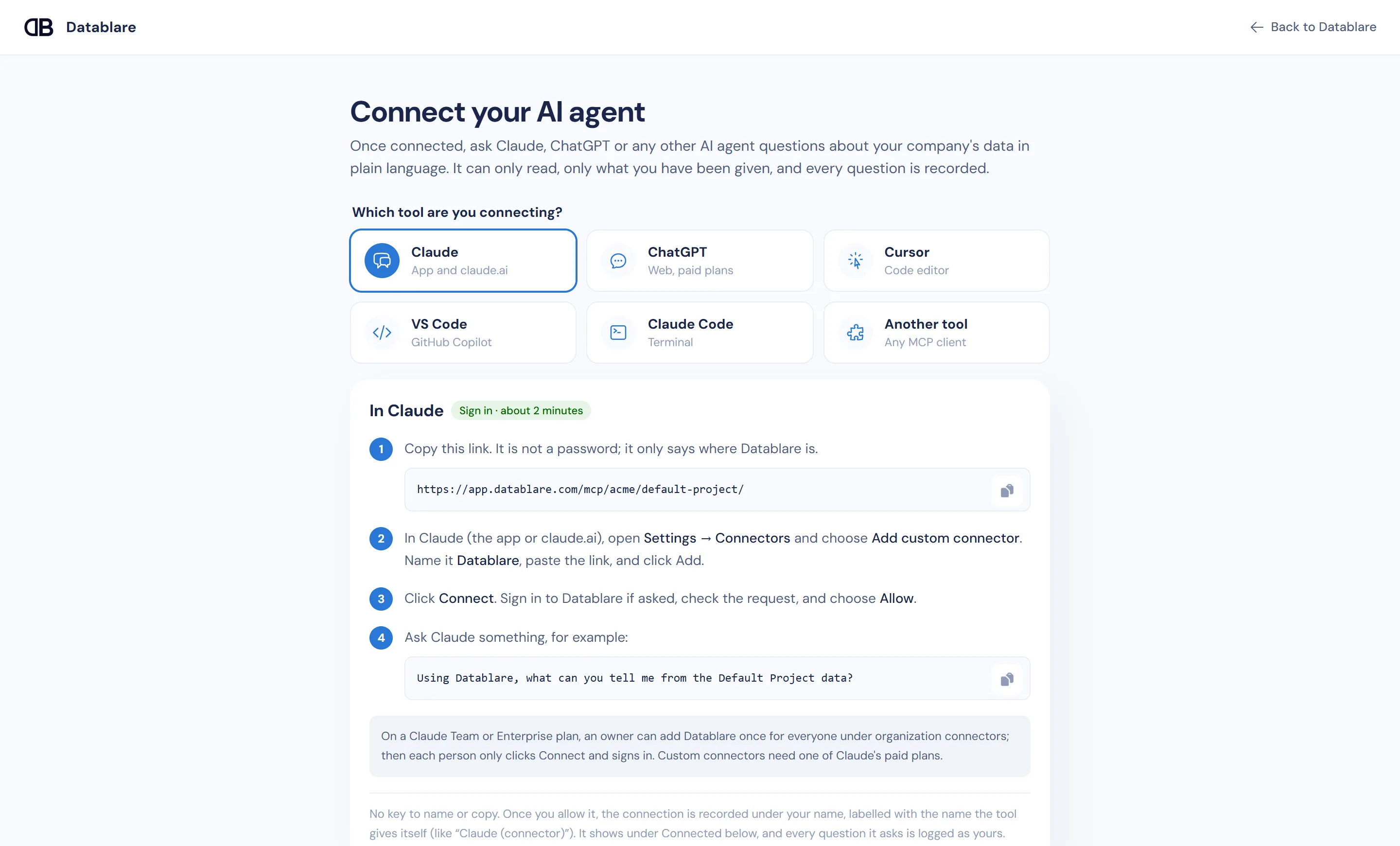
To connect Claude to your database, add Datablare as a custom connector: paste your project’s MCP link in Claude under Settings → Connectors, click Connect, sign in to Datablare and choose Allow. From then on Claude can answer questions from your PostgreSQL, MySQL, SQL Server or other database — read-only, limited to the tables and columns you picked, with every query on record. There is nothing to install and no password to paste into Claude.
Why not hand Claude a database login directly
The quick route most guides show is a local MCP server with a connection string in a config file. It works, but look at what it gives Claude:
- Whatever the login can do. If that login can write, a misread instruction can become an
UPDATEor aDROP. - Every table. Salary columns, phone numbers and internal tables are all in reach.
- No record. Nobody can say later who asked what, or which SQL ran.
- Hard to take back. The password lives on someone’s laptop until you rotate it.
What Datablare adds between Claude and your data
Datablare is a remote MCP server that sits in front of your database. Claude talks to Datablare; Datablare decides what may run.
- Read-only, enforced twice. A SQL guard refuses anything that is not a single read — no
INSERT,UPDATE,DELETE,DROP, multiple statements or side-effect functions. Then the database itself keeps it read-only: a read-only session, or on SQL Server and Snowflake a transaction that is always rolled back. Your own read-only login is a third layer. - Tables and columns you choose. Tables you don’t select don’t exist as far as Claude is concerned. Hide a column such as
email, and any query that reads it is refused, even if Claude names it directly. - Every query on record. Audit shows who asked, the question, the SQL, whether it was allowed, rows returned and time taken.
- Access you can take back. Disconnect a connection, or remove a person, and their access stops.
- Hosted in India. Query results pass through to Claude and are never stored by Datablare.
More detail: how it works and security.
How the Claude custom connector signs in
Datablare follows the MCP authorization spec, so Claude discovers the sign-in by itself. When you click Connect, Claude registers, sends your browser to Datablare, and you approve the request. Only someone an admin has given the Analyst role (or higher) on the project can allow a connection; anyone else is offered a request to the admins instead.
Because each person signs in with their own Datablare account, each sees only what they have been given — and every question is logged under their name. The connection shows under Connected on the Connect page, labelled with the name Claude gives itself — for example Claude (connector).
Claude Desktop and claude.ai
The steps are the same in the Claude app and on claude.ai: Settings → Connectors → Add custom connector. If you use a Claude setup that can only start local servers, the Connect page also offers a personal key with a small mcp-remote bridge (needs Node.js). Keys are shown once and can be revoked at any time.
Create a read-only login first
Datablare blocks writes on its own, but give it a login that can only read anyway — defence in depth. For PostgreSQL:
CREATE ROLE datablare_reader LOGIN PASSWORD 'choose-a-strong-password'
  CONNECTION LIMIT 5;
ALTER ROLE datablare_reader SET statement_timeout = '30s';

GRANT CONNECT ON DATABASE your_database TO datablare_reader;
GRANT USAGE ON SCHEMA public TO datablare_reader;
GRANT SELECT ON ALL TABLES IN SCHEMA public TO datablare_reader;
The setup screen gives you the exact SQL for your engine. See the PostgreSQL, MySQL and SQL Server pages for engine-specific notes.
Questions to try with the e-commerce sample
No database handy? Datablare has a one-click e-commerce sample — customers, products, orders, stock, sizes and colours, already described. Connect it, add the connector, and ask Claude:
- What are our best-selling products this month?
- Which colours sell best in women’s products?
- Which articles are running low on stock?
- How many orders did we get each week this quarter?
Then open Audit to see the SQL behind each answer.
Get started
Create a free account, connect a database or the sample, and add Claude in about two minutes. Plans are on the pricing page. Using another tool? See ChatGPT, Cursor or Claude Code.